What each one sends you
Checked November 2026. Prices per month. US dollars unless marked.
| From | Reads | What lands in your inbox | Written up for you? | |
|---|---|---|---|---|
| GA4's scheduled email | Free | GA4 | A report as a PDF or CSV, daily to quarterly | No |
| Mixpanel or Amplitude subscriptions | In your plan | That tool only | Pictures of up to eight charts from one board | No |
| PostHog subscriptions | In your plan | PostHog | Up to 20 insights, or a written report from a prompt you write | Yes, from PostHog data |
| Looker Studio | Free, plus connectors | GA4, and others through connectors | A PDF of the report, daily, or hourly with Pro | No |
| DashThis | US$44 a month billed yearly, 3 dashboards | GA4 and 30+ sources. Mixpanel not listed. | The dashboard, updated, by email | AI insights included |
| StoriBot | Free for one job, then from A$29 incl. GST | GA4, Mixpanel, PostHog, Amplitude, HubSpot, Mailchimp, Shopify, Stripe, Google Ads, Zernio | A written report: what changed, what it means, and what to try, each with this week's and last week's number | Yes. Reply to ask why or to change it. |
Where StoriBot fits
Someone has to build the board and pick what goes in it. Then the email shows what the board shows. StoriBot starts from what you want to know, reads every system you connect, and writes the answer in the email. Mixpanel and Amplitude are still better for drilling into a single event live.
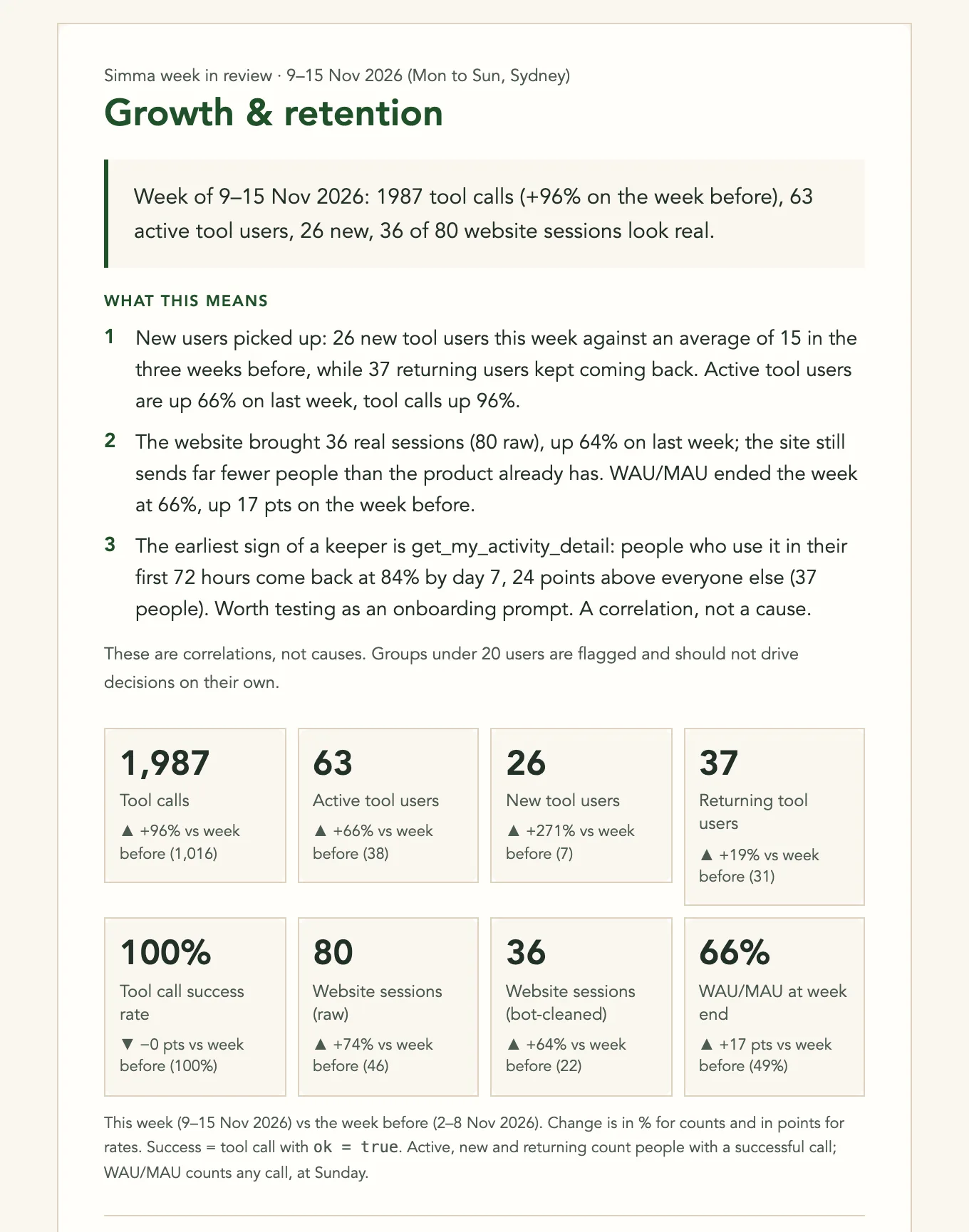
The picture below is a real report, built for Simma, a training app, from Mixpanel and GA4. Simma asked for new and returning users, which first actions go with people coming back, and website visits once bots are removed. Yours starts from one of the jobs below and becomes what you ask for.
The full report is a page in your workspace. Add up to 50 people to the email. When you reply, StoriBot answers from the same data, and next week's report follows what you asked for.





%20--%3e%3csvg%20version='1.1'%20id='Layer_1'%20xmlns='http://www.w3.org/2000/svg'%20xmlns:xlink='http://www.w3.org/1999/xlink'%20x='0px'%20y='0px'%20viewBox='0%200%20109.5%20124.5'%20style='enable-background:new%200%200%20109.5%20124.5;'%20xml:space='preserve'%3e%3cstyle%20type='text/css'%3e%20.st0{fill:%2395BF47;}%20.st1{fill:%235E8E3E;}%20.st2{fill:%23FFFFFF;}%20%3c/style%3e%3cg%3e%3cpath%20class='st0'%20d='M95.9,23.9c-0.1-0.6-0.6-1-1.1-1c-0.5,0-9.3-0.2-9.3-0.2s-7.4-7.2-8.1-7.9c-0.7-0.7-2.2-0.5-2.7-0.3%20c0,0-1.4,0.4-3.7,1.1c-0.4-1.3-1-2.8-1.8-4.4c-2.6-5-6.5-7.7-11.1-7.7c0,0,0,0,0,0c-0.3,0-0.6,0-1,0.1c-0.1-0.2-0.3-0.3-0.4-0.5%20c-2-2.2-4.6-3.2-7.7-3.1c-6,0.2-12,4.5-16.8,12.2c-3.4,5.4-6,12.2-6.8,17.5c-6.9,2.1-11.7,3.6-11.8,3.7c-3.5,1.1-3.6,1.2-4,4.5%20c-0.3,2.5-9.5,73-9.5,73l76.4,13.2l33.1-8.2C109.5,115.8,96,24.5,95.9,23.9z%20M67.2,16.8c-1.8,0.5-3.8,1.2-5.9,1.8%20c0-3-0.4-7.3-1.8-10.9C64,8.6,66.2,13.7,67.2,16.8z%20M57.2,19.9c-4,1.2-8.4,2.6-12.8,3.9c1.2-4.7,3.6-9.4,6.4-12.5%20c1.1-1.1,2.6-2.4,4.3-3.2C56.9,11.6,57.3,16.5,57.2,19.9z%20M49.1,4c1.4,0,2.6,0.3,3.6,0.9C51.1,5.8,49.5,7,48,8.6%20c-3.8,4.1-6.7,10.5-7.9,16.6c-3.6,1.1-7.2,2.2-10.5,3.2C31.7,18.8,39.8,4.3,49.1,4z'/%3e%3cg%3e%3cpath%20class='st1'%20d='M94.8,22.9c-0.5,0-9.3-0.2-9.3-0.2s-7.4-7.2-8.1-7.9c-0.3-0.3-0.6-0.4-1-0.5l0,109.7l33.1-8.2%20c0,0-13.5-91.3-13.6-92C95.8,23.3,95.3,22.9,94.8,22.9z'/%3e%3cpath%20class='st2'%20d='M58,39.9l-3.8,14.4c0,0-4.3-2-9.4-1.6c-7.5,0.5-7.5,5.2-7.5,6.4c0.4,6.4,17.3,7.8,18.3,22.9%20c0.7,11.9-6.3,20-16.4,20.6c-12.2,0.8-18.9-6.4-18.9-6.4l2.6-11c0,0,6.7,5.1,12.1,4.7c3.5-0.2,4.8-3.1,4.7-5.1%20c-0.5-8.4-14.3-7.9-15.2-21.7c-0.7-11.6,6.9-23.4,23.7-24.4C54.7,38.2,58,39.9,58,39.9z'/%3e%3c/g%3e%3c/g%3e%3c/svg%3e)
