
Until now, StoriBot read files. Google Sheets, uploads, anything you could put in a folder.
That changes today. StoriBot now connects directly to APIs — and to a growing list of MCP servers that behave like APIs. The data sitting inside the rest of your software stack is now available to any Stori you build.
The real barrier was never the key
Most platforms have offered an API for years. The key isn't the problem. The problem is what happens after you generate one.
You get a long string of letters and numbers. A page of documentation aimed at developers. A vague suggestion that you "POST to /v2/customers with the right headers." If you're not technical, you copy the key, paste it somewhere it might be useful, and hope something works. Usually nothing does, and the integration ends up sitting broken in a settings tab.
That's not a user failing. The tools were built assuming someone technical sits between the key and the result. For small teams without that someone in the room, the API may as well not exist.
How StoriBot handles the wiring
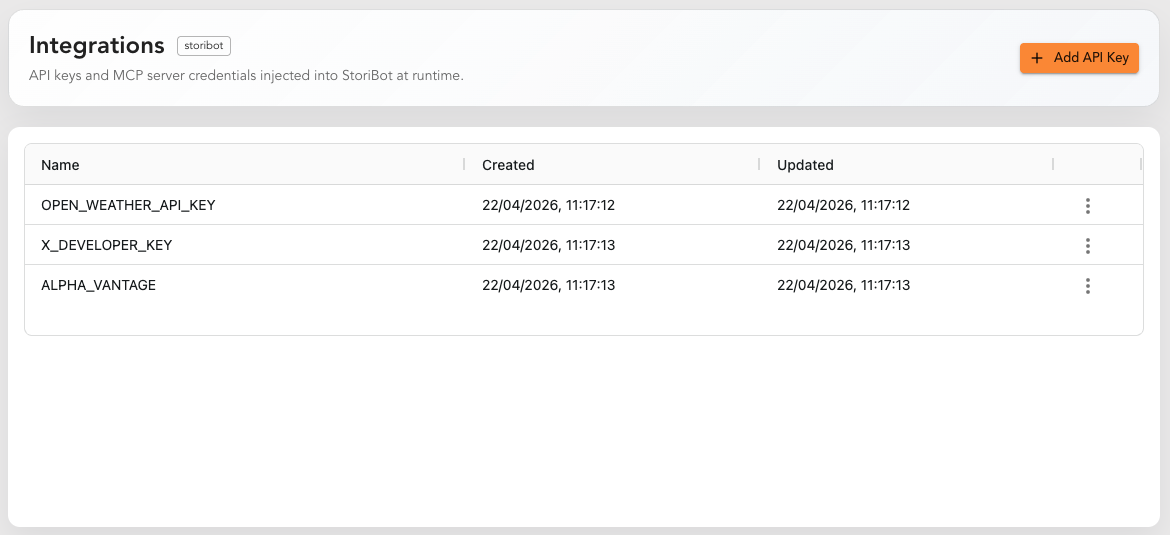
Paste your key into your StoriBot account once. That's the setup.
From that point on, every Stori you build can use it. Ask the agent to pull last week's revenue from your accounting tool, this morning's leads from your CRM, or yesterday's sessions from your analytics — and it does. The key lives in your account. The agent uses it on your behalf. You never have to think about it again.
If you've added keys for five services, all five are available from any Stori. Mix them. Pull from a Google Sheet and an API in the same report. The data lands where it needs to land.
What an API actually is
Briefly, because you don't need to know much: an API is a way for two pieces of software to talk to each other. When your accounting tool pulls sales from your POS, that's an API. When your email tool tags a new customer, that's an API.
The "key" you keep being asked for is a password — it tells the service who's asking, so it only releases data to people allowed to see it.
What's been missing for non-technical users isn't understanding the concept. It's the part where someone wires the connection up and keeps it running. StoriBot is now that someone.
From files to services
This is the bigger shift. Until now, StoriBot worked with what you could export. From today, it works with what you already have running.
Three things change in practice:
Your Storis stay current automatically. When the underlying service updates, the next replay reflects it. No re-uploading, no "let me grab a fresh CSV."
You can blend live and static sources. A single Stori can read from a CRM API, a Google Sheet, and a Stripe export at the same time. The agent treats them as one picture of the business.
The cost of trying something is lower. You don't need a developer-week to test whether a service's data is useful in a report. Paste the key, build a Stori, see if the answer is in there. If it isn't, move on.
About MCP
MCP — Model Context Protocol — is a newer standard for letting agents talk to data sources. Not every MCP server is a clean fit, but the ones that expose data the way a service would are now supported. If a tool you use ships an MCP server and it looks like a data source, StoriBot can probably read from it. The list is growing.
What you actually need to do
- Generate a key in the service you want to use.
- Add it to your StoriBot account.
- Build a Stori. Reference the data source in your prompt.
The first step is the only one that varies — every service buries its key generator in a slightly different settings menu. The other two are the same every time.
The takeaway
APIs were never the bottleneck. The wiring was. With keys handled at the account level and applied automatically by the agent, the value an API was always supposed to deliver becomes available to the people who actually need it: small teams who paid for the software and would like to see what's inside it.
If you've been ignoring the API tab in your tools because it wasn't worth the trouble, it's worth another look.
Related reading: